What Happens When You Type 'ls -l *.c' in the Shell?
A deep dive into what happens under the hood when you run a command in the shell — from parsing to fork(), execve(), and wait() system calls.
A journey through the shell’s inner workings.
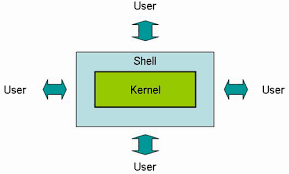
You have to understand what a shell is in relation to the kernel to understand what really happens when you run a command.
The Kernel is the most fundamental part of a computer operating system. It’s a program itself and it controls all other programs on the computer. It talks to hardware and software and is highly involved in resource management.
The Shell is an application that executes programs called commands through an interactive user interface with an operating system. It is the layer of programming that understands and executes the commands a user enters. In some systems, the shell is called a command interpreter.
Use the syntax below to write a command with an argument:
command [arg1] [arg2] .. [argn]Now what is ls?
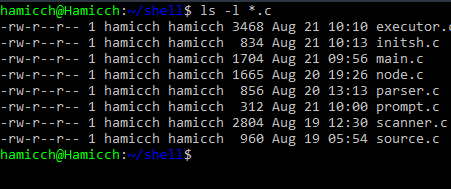
ls is a shell command that lists files and directories. With the -l option, ls *.c will list files with a .c extension in a long format — showing permissions, owners, and timestamps.
What happens under the hood when you type “ls -l *.c” and “enter” in the shell
After inputting the command into the shell prompt, the shell reads the command using getLine() from STDIN. It stores the input into a buffer as a string.
-
The buffer reads from STDIN to the given block size and writes each block to the standard output.
-
The string is broken into tokens by removing whitespaces and stored in an array of strings.
-
The shell checks if any of the tokens have an alias defined. If there is, it replaces the token with its value.
-
If there isn’t, it checks if any of the tokens is a built-in function.
-
If it’s not there either, the shell looks for a program file called
lsin the shell’s environment — specifically in the$PATHvariable. The$PATHvariable is a list of directories the shell searches every time a command is entered. It is parsed using=as a delimiter; directories are tokenized using:as a delimiter and recursively searched by appending the command at the end of the path. The search starts in thepwdand then its parent, and so on with all other commands. -
To execute
ls, the following system calls are made: fork(), execve() and wait(). System calls are interactions we make with the kernel.-
The fork() system call duplicates the shell by creating a child shell of the parent shell.
-
The execve() system call stops the old duplicate process (parent shell), loads the new process (child shell which is ls in this case) and starts the new program by replacing the current process’s memory stack with the new data loaded from the ls executable file.
-
The wait() system call lets the parent process keep track of its children in the background.
-
Lastly
Once the ls -l *.c command is executed, the shell frees up memory, exits and prompts the user for input again.
All these happen under a few milliseconds in most cases, depending on your machine power.